1. Home
  2. AI assistant

An AI finance assistant that knows your records

Ask questions about your money in plain words and get answers based on your own records, accounts and budgets. The AI assistant is part of RapidEx Premium.

What you can ask

Start with a simple question

These four are suggested in the app. You can ask anything about your own spending, income, budgets and accounts.

  • "How much did I spend this month?"

    The total so far, and the categories that make up most of it.

  • "What is my biggest expense category?"

    Where the largest share of your money goes, with the numbers.

  • "Am I within my budgets?"

    Which budgets are on track, which are close, and which are over.

  • "How can I save more next month?"

    Practical ideas based on your own budgets and records.

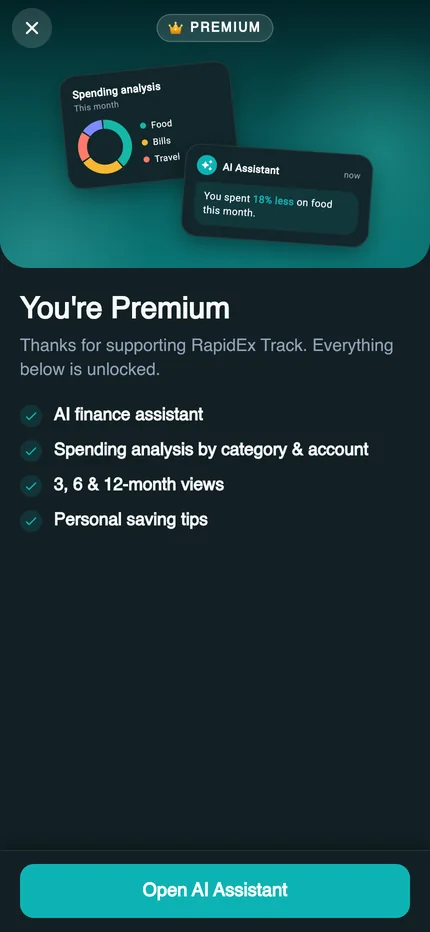
RapidEx Premium screen listing AI finance assistant, spending analysis by category and account, 3, 6 and 12-month views and personal saving tips
RapidEx Premium

One subscription, four upgrades

The AI assistant comes with everything else in RapidEx Premium.

  • AI finance assistant that answers from your own records.
  • Spending analysis by category and by account.
  • 3, 6 and 12-month views of your records.
  • Personal saving tips based on your budgets.

What it looks at

To answer you, the assistant reads a summary of your own data. It never sees anyone else's.

  • Your accounts: the balance of each account and the total.
  • The last 12 months: income, expense and net for each month.
  • The last 3 months by category: what you spent and earned in each category.
  • This month's budgets: limit, spent and remaining.
  • Your recent records: date, type, amount, account, category and the start of the note.
  • Your currency and today's date, so the answers use the right symbols and periods.

What it does not do

The assistant is a helper for everyday money questions, not a financial adviser.

  • No investment, tax or legal advice. It will say so if you ask.
  • Read only: it cannot add, change or delete your records, accounts or budgets.
  • On topic: it answers about your data, personal budgeting and saving, and how to use the app.

Good to know

The practical details.

  • Your language: it replies in the language you write in, for example English, Urdu or Roman Urdu.
  • Daily limit: there is a limit on messages per day, currently 50. The app tells you when you are running low.
  • Chat history is saved to your account so you can pick up where you left off. "Clear chat" deletes it.
  • Copy an answer by tapping the message.

Privacy: when you send a message, your question and the summary described above are sent to our AI service provider to write the answer. This only happens when you use the assistant. See the privacy policy.

How to get it

The AI assistant is included in RapidEx Premium.

  • In the app, tap the AI Assistant icon at the top right, or open the menu and choose AI Assistant.
  • Plans and prices are shown before you subscribe.
  • Billing is handled by Google Play. You can cancel any time in your Google Play subscriptions.
  • Also in Premium: spending analysis by category or account, and 3, 6 and 12-month views of your records.
  • Still free: records, budgets, accounts and categories do not need Premium.

Ask your money a question

Get RapidEx Track on Google Play, add your records, and unlock the AI assistant with Premium when you are ready.