New AI finance assistant

Track expenses. See where your money goes.

RapidEx Track is a simple expense tracker and budget planner for Android. Record every expense, income and transfer in a few taps and set a monthly budget for each category. Premium adds spending analysis and an AI finance assistant.

  • Free to use
  • No ads
  • 90 currencies
  • Saved to your account
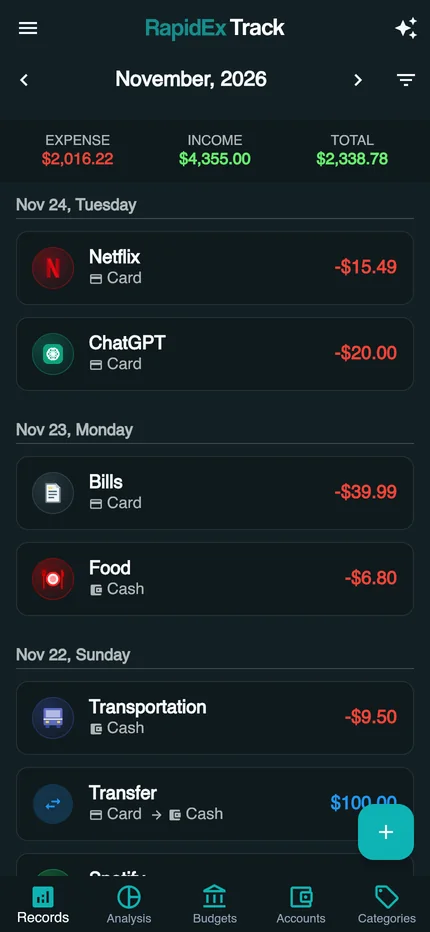
RapidEx Track records screen for November with expense, income and total, and a list of expenses and a transfer grouped by day
RapidEx Track analysis screen with a donut chart of expenses by category
  • 3Record typesExpense, income and transfer
  • 6Period viewsDay, week and month free, three more with Premium
  • 34Built-in categoriesAdd as many as you like
  • 90CurrenciesPick yours, change it any time
What it does

Everything you need to track your money. Nothing you don't.

Four screens do the work: your records, your budgets, your accounts and, with Premium, an analysis of your spending.

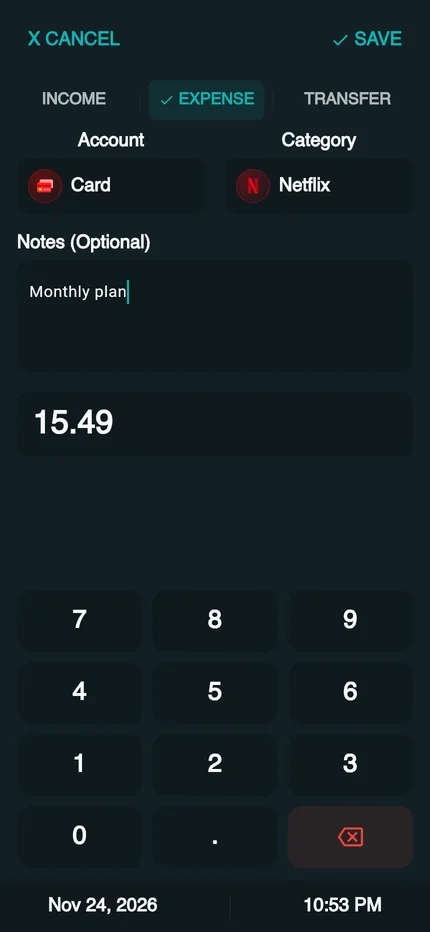
Adding a 15.49 expense from the Card account in the Netflix category with a note, using the number keypad
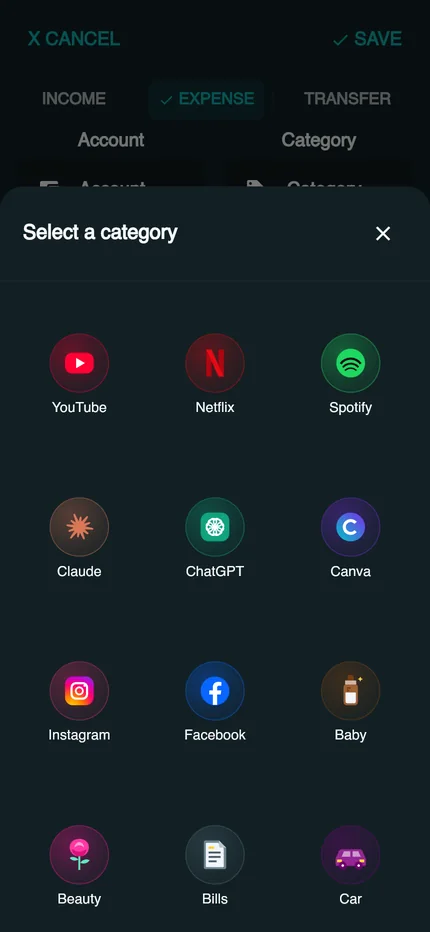
Category picker with illustrated icons: YouTube, Netflix, Spotify, Claude, ChatGPT, Canva, Instagram, Facebook, Baby, Beauty, Bills and Car
Records

Record it in a few taps

Tap +, choose expense, income or transfer, pick the account and category, and type the amount. Add a note, a date and a time if you want to.

  • Expenses, income and transfers between your accounts, all in one list.
  • Browse by day, week or month. Premium adds 3 months, 6 months and a full year.
  • Edit or delete any record and every total and balance updates with it.
More about records
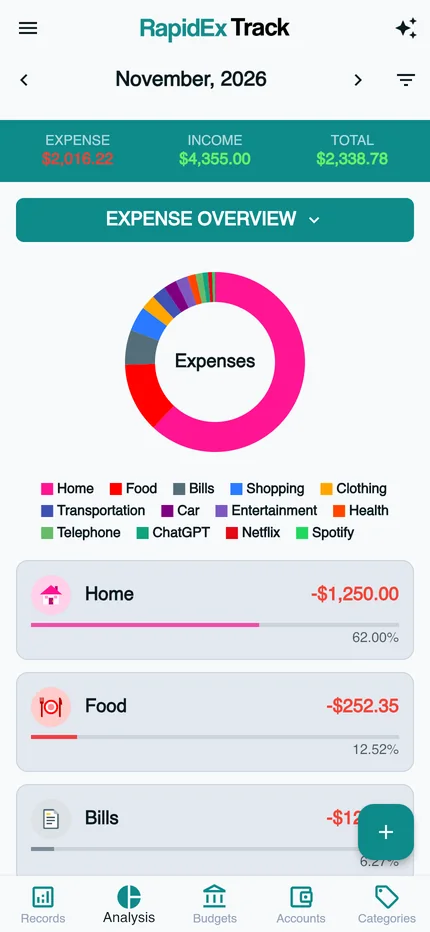
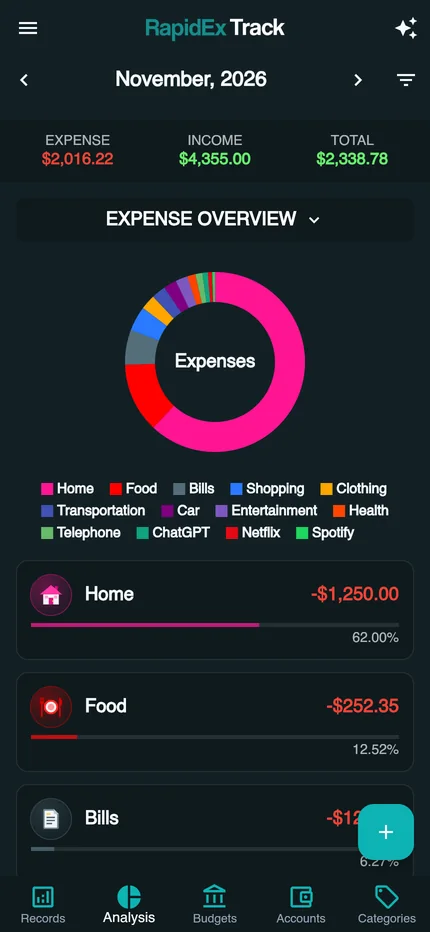
Expense overview for November: a donut chart and a list showing Home at 62 percent, Food at 12.52 percent and Bills
Analysis Premium

Know exactly where it went

A clear chart of your expenses for any period, split by category or by account. Every slice shows its amount and its share of the total.

  • Expense overview shows which categories take the most.
  • Account analysis shows which account the money left from.
  • Expense, income and total for the period, always in view.
  • Part of RapidEx Premium, together with the AI assistant.
More about analysis
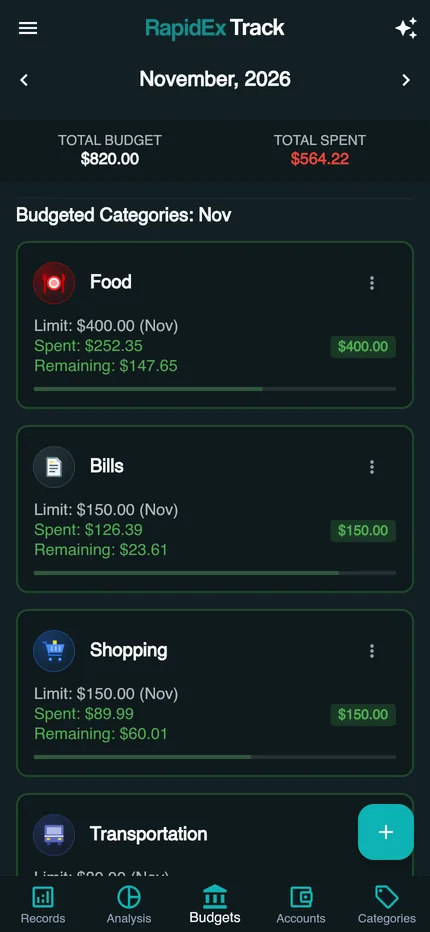
Budgets for November: Food, Bills and Shopping each with a limit, the amount spent, the amount remaining and a progress bar
Budgets

A monthly limit for every category

Set a budget for any expense category and watch what is spent and what is left as the month goes on.

  • Limit, spent and remaining for each category, with a progress bar.
  • "Limit exceeded" appears as soon as a category goes over.
  • Total budget and total spent for the month at the top.
More about budgets
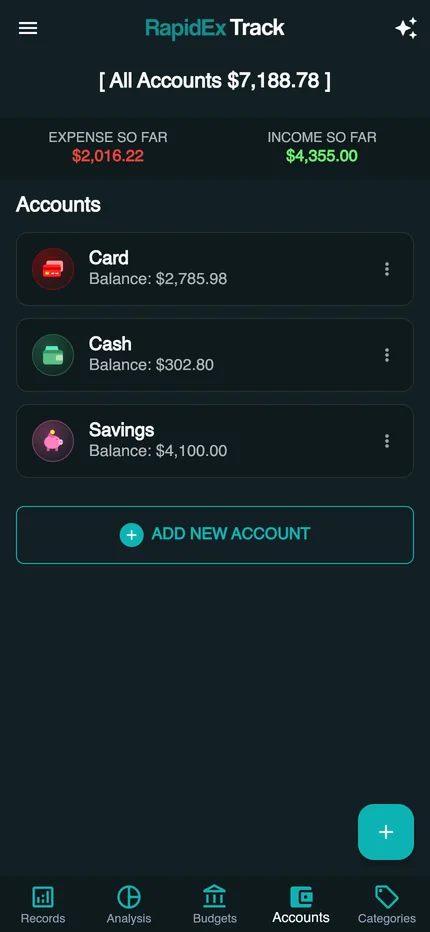
Accounts screen with the total of all accounts and the balances of the Card, Cash and Savings accounts
Accounts

Balances that always add up

Keep cash, cards and savings separate, or add any account you like. Balances are calculated from your records, so they are always consistent.

  • Card, Cash and Savings are ready when you start. Add, rename or remove accounts freely.
  • Transfers move money between accounts without counting as income or expense.
  • One total for all accounts, plus expense and income so far.
More about accounts
RapidEx Premium

Ask your money a question

RapidEx Premium adds a personal AI finance assistant that knows your records. Ask in plain words and get answers based on your own records, accounts and budgets.

  • See where your money goes without building a report.
  • Monthly summaries and comparisons of how your months stack up.
  • Budget check-ins that tell you what is on track and what is over.
  • Practical saving tips based on your own spending.
Also included

The details are taken care of

Make the app yours, and pick up where you left off on any phone.

Categories your way

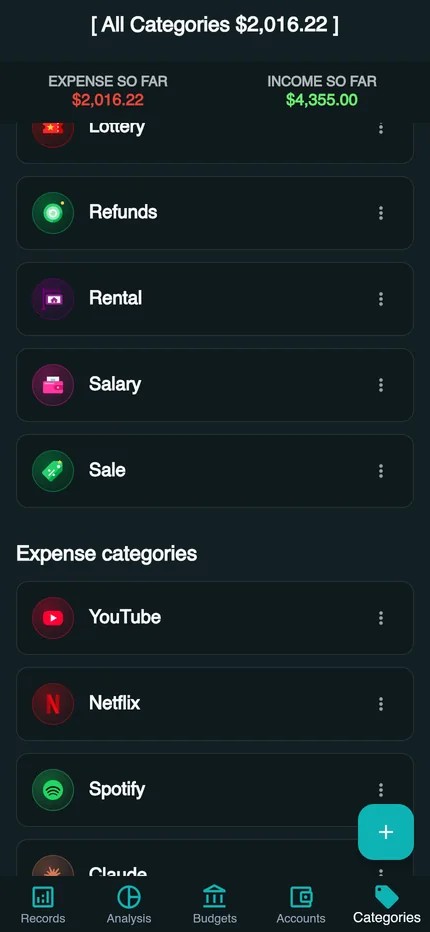
Start with 34 ready-made categories, including YouTube, Netflix, Spotify and ChatGPT for your subscriptions, then add your own. Choose from 57 illustrated icons and 12 colours.

  • Netflix
  • Spotify
  • Food
  • Bills
  • Shopping
  • Health
  • Salary
Categories screen with income categories such as Refunds, Rental, Salary and Sale, and expense categories starting with YouTube, Netflix and Spotify

Light and dark theme

Dark by default and easy on the eyes. Prefer a bright look? Switch to the light theme in settings.

The analysis screen in the light theme

90 currencies

Choose your currency when you start and change it any time from the menu.

Email or Google sign-in

Sign up with your email and a password, or continue with Google in one tap.

Saved to your account

Sign in on another phone and your records, accounts and budgets are already there.

How it works

Up and running in a minute

  1. Create your account

    Sign up with email or continue with Google, then choose your currency. Common accounts and categories are already set up.

  2. Record as you spend

    Tap + for every expense, income or transfer. It takes a few seconds, wherever you are.

  3. See the full picture

    Keep an eye on your budgets, and with Premium open the spending analysis or ask the AI assistant what changed this month.

Privacy

Your money, your data

A finance app has to earn trust. Here is how RapidEx Track handles your data.

  • Only you can read it

    Every row in the database belongs to one account and can only be read or changed by that account.

  • Encrypted connection

    Your data travels between the app and the server over an encrypted connection.

  • No ads, no bank login

    There are no ads in the app, your data is not sold, and the app never asks for your bank details.

  • Delete it any time

    Delete your records, reset everything or delete your account for good, from inside the app.

Read the full privacy policy
Pricing

Free to track. Premium when you want answers.

Recording, budgets, accounts and categories are free. Premium adds spending analysis, longer views and the AI assistant.

Free

$0

Everything you need to record and budget, with no ads.

  • Expenses, income and transfers
  • Monthly budgets per category
  • Daily, weekly and monthly views
  • Accounts and custom categories
  • Light and dark theme
  • Saved to your account, 90 currencies
Get it on Google Play

RapidEx Premium

Subscription

Everything in Free, plus spending analysis, longer views and a personal AI finance assistant.

  • AI finance assistant: ask about your spending in plain words
  • Spending analysis: a chart of your expenses by category or by account
  • 3, 6 and 12-month views: look back over a quarter, half a year or a full year
  • Personal saving tips: practical ideas based on your own budgets and records
See what Premium can do

Plans and prices are shown in the app before you subscribe. Subscriptions are billed and managed through Google Play.

FAQ

Questions, answered

Is RapidEx Track free?

Yes. Recording expenses, income and transfers, budgets, accounts and categories are free, and the app has no ads. RapidEx Premium is an optional subscription that adds spending analysis, 3, 6 and 12-month views and the AI finance assistant.

What does RapidEx Premium add?

Premium adds spending analysis (a chart of your expenses by category or by account), 3, 6 and 12-month views of your records, and a personal AI finance assistant that knows your records. You can ask about your spending in plain words, check how your budgets are doing and get practical saving tips. The plans and prices are shown in the app before you subscribe.

Does RapidEx Track connect to my bank account?

No. You add your records yourself, in a few taps. The app never asks for your bank login and does not read your bank or card transactions.

Which currencies are supported?

You can choose from 90 currencies. You pick one when you first open the app and can change it any time from the menu. The currency only changes how amounts are shown; existing amounts are not converted.

Can I use it on more than one phone?

Yes. Your data is saved to your account, so when you sign in on another phone your records, accounts, categories and budgets are there. You can sign up with your email or continue with Google.

Does the app work offline?

Not at the moment. RapidEx Track saves every change to your account straight away, so it needs an internet connection to load and save your data.

What can I ask the AI assistant?

Questions about your own money, such as "How much did I spend this month?", "What is my biggest expense category?", "Am I within my budgets?" or "How can I save more next month?". It answers from your own records, accounts and budgets, in the language you write in. It does not give investment, tax or legal advice, and it cannot add or change records.

Is my data private?

Your records are stored in your own account and protected so that only you can read or change them. The connection is encrypted, there are no ads, and your data is not sold. Details are in the privacy policy.

I forgot my password. How do I reset it?

On the log in screen, tap Forgot password and enter your email. We send you a 6-digit code: type it into the app, then choose a new password.

How do I delete my account and data?

In the app, open the menu, choose Account & Settings, then Delete my account. This permanently deletes your account and everything in it. You can also request deletion by email without opening the app.

I used an earlier version of the app. What happens to my data?

After you update, sign in once and the data on your phone is moved to your account automatically.

Start tracking today

Download RapidEx Track, record your first expense, and see where your money goes by the end of the week.